Section 15-00: Audio Systems—Service
1993 Mustang Workshop Manual
DIAGNOSIS AND TESTING

Diagnosis Charts

Tools Required:

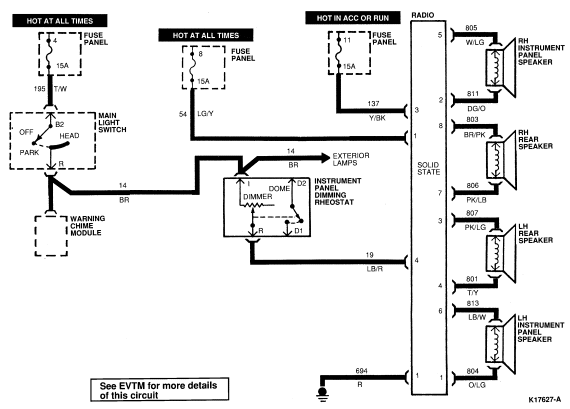
Refer to the wiring diagrams and the diagnosis Charts to isolate radio concerns.

Electronic Search Radio (ESR)


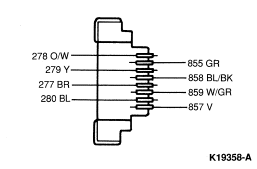
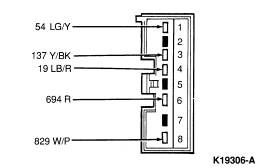
Radio Connector


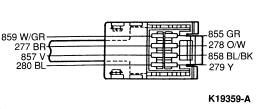
Speaker Connector
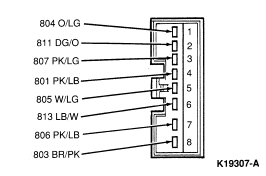


Electronic Stereo Cassette (ESC Lo-Power and CDR)
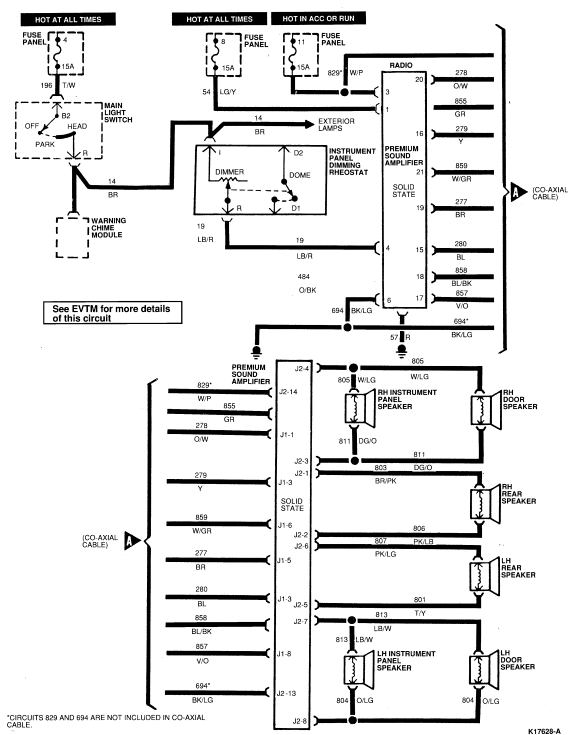


Amplifier
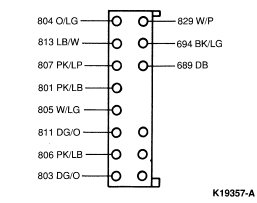


Radio
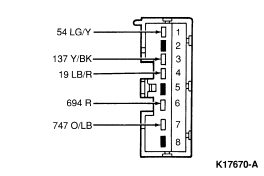


Circuit Description Chart
Circuit No. Description Gauge Color Stripe
829 Input to P.S.A. 14 W/P X
694 Amplifier Power Return 14 BK/LG X
813 Speaker Return LH Front Speaker 18 LB/W X
811 Speaker Return RH Front Speaker 18 DG/O X
822 Speaker Voice Coil Feed 18 BK/G X
807 Speaker Voice Coil Feed Rear (LH Channel) 18 PK/LP X
806 Speaker Voice Coil Feed Rear (RH Channel) 18 PK/LB X
805 Speaker Voice Coil Feed Front (RH Channel) 18 W/LG X
804 Speaker Voice Coil Feed Front (LH Channel) 18 O/LG X
803 Speaker Voice Coil Return Rear (RH Channel) 18 DG/O X
801 Speaker Voice Coil Return Rear (LH Channel) 18 PK/LB X
57 Ground 20 BK  
859 Speaker Voice Coil Return 18 W/P X
137 Radio and Antenna Feed 18 Y/BK X
54 Memory Feed 18 LG/Y X
19 Instrument Panel Lamps Feed 18 LB/R X
278 RH RR + Input 24 O/W X
279 RH FR + Input 24 Y  
277 LH RR + Input 24 BR  
280 LH FR + Input 24 BL  
855 RH RR - Input 24 GR  
858 RH FR - Input 24 BL/BK X
859 LH RR - Input 24 W/GR X
857 LH FR - Input 24 Y/O  
689 Mute 18 DB  


PINPOINT TEST A: ALL ELECTRONIC RADIO CONTROL FUNCTIONAL TEST


A1 VERIFY OPERATION OF RADIO

Yes
GO to A3 .

No
GO to A2 .


A2 VERIFY SOUND FROM SPEAKERS

Yes
GO to A17 .

No
REFER to radio inoperative procedure.


A3 AM INDICATOR TEST

  • Push the band or AM button.
  • Is "AM" indicator lit?
Yes
GO to A4 .

No
REMOVE radio for service.


A4 UP TEST

  • Depress "seek (>)" or "scan" button and verify that number on display increases (if display reads 1610 AM or 107.9 FM display will not increase and the "seek (>)" button should be depressed until display reads less than 1610 AM or 107.9 FM).
  • Is "up" function OK?
Yes
GO to A5 .

No
REMOVE radio for service.


A5 DOWN TEST

  • Depress "seek (<)" button and verify that number on display decreases (if display reads 530 AM or 88.1 FM, display will not decrease and the "seek (<)" button should be depressed until display reads greater than 530 AM or 88.1 FM).
  • Is "down" function OK?
Yes
GO to A6 .

No
REMOVE radio for service.


A6 FAST UP TEST

  • Push tune + button and hold.
  • Is "fast up" function OK?
Yes
GO to A7 .

No
REMOVE radio for service.


A7 FAST DOWN TEST

  • Push tune - button and hold.
  • Is "fast down" function OK?
Yes
GO to A8 .

No
REMOVE radio for service.


A8 STATION RECALL MEMORY TEST

  • Depress seek or scan tuning to select desired station. When station is tuned, depress and hold a memory button. When memory button is depressed, station's sound will be interrupted. Depress button for approximately two seconds. When station's sound returns, button is "set" and may be released. This process is repeated for each memory button. Turn radio off then on. Depress each station recall button and verify that stations indicated are the same as stations stored above.
  • Is memory test successful?
Yes
GO to A9 .

No
REMOVE radio for service.


A9 FM INDICATOR TEST

  • Push the band or FM button.
  • Is "FM" indicator lit?
Yes
REPEAT the following tests described earlier on the FM band: A4

    No
REMOVE radio for service.


A10 FM STEREO INDICATOR TEST

  • Tune radio to a known FM stereo station.
  • Is stereo indicator lit?
Yes
GO to A11 .

No
REMOVE radio for service.


A11 VOLUME CONTROL TEST

  • Tune radio to a local station.
  • Push VOLUME button up to increase volume or push down to decrease volume.
  • Does volume change properly?
Yes
GO to A12 .

No
CHECK speaker connection and PERFORM speaker test. REPEAT volume vehicle test. If volume still is not OK, REMOVE radio to service. If volume OK, GO to A12.


A12 TONE CONTROL TEST

  • Adjust bass control to right and verify that an increase in the low frequency content of the sound occurs.
  • Adjust treble control to right and verify that an increase in the high frequency content of the sound occurs.
  • Do bass and treble change properly?
Yes
GO to A13 .

No
REMOVE radio for service.


A13 BALANCE CONTROL TEST

  • Adjust button (L or R) balance control at speaker from left to right to verify that sound moves from LH speakers to RH speakers.
  • Does balance change properly?
Yes
GO to A14 .

No
CHECK speakers and speaker connections. REPEAT balance control test. If balance still is not OK — REMOVE radio for service. If balance OK, GO to A14.


A14 FADER CONTROL TEST

  • Adjust fader control at speaker button (marked F or B) left to right and verify that sound moves from front speakers to rear speakers.
  • Does fader change properly?
Yes
GO to A15 .

No
CHECK speakers and speaker connections. REPEAT fader control test. If fader is not OK, REMOVE radio for service. If fader is OK, GO to A15.


A15 SEEK TEST

  • Depress seek button and verify that radio stops on next station.
  • Does radio stop on next station?
Yes
GO to A16 .

No
TURN radio off and then on to determine if seeking stops. If seek does not stop, REMOVE radio for service. If seek does stop, GO to A16.


A16 SCAN TEST

  • Tune radio on AM band (should be done outside of any building). Press scan button and count the number of listenable stations that can be tuned. Compare to a vehicle with a known, good radio system.
  • Are normal number of stations received?
Yes
GO to A17 .

No
PERFORM antenna system check. REFER to Section 15-02. REPEAT scan test. If still not receiving normal number of stations, REMOVE radio for service. If normal number of stations received GO to A17.


A17 DISPLAY TEST

  • Tune radio to 1000 AM.
  • Is display correct and "AM" indicator lit?
Yes
GO to A18 .

No
Remove radio for service.


A18 DISPLAY TEST (Continued)

  • Tune radio to 88.9 FM.
  • Is display correct and "FM" indicator lit?
Yes
GO to A19 .

No
REMOVE radio for service.


A19 DISPLAY TEST (Continued)

  • Tune radio to FM stereo station.
  • Is display correct and "ST" indicator lit?
Yes
End of electronic radio controls function test. If other concerns exist, i.e., poor reception or noisy reception, REFER to appropriate diagnostic procedures.

No
REMOVE radio for service.


PINPOINT TEST B: NOISY AM RECEPTION—ENGINE RUNNING, VEHICLE IN/NOT IN MOTION


B1 CHECK ANTENNA CABLE CONNECTIONS

  • Verify condition by operating radio while engine is running, with vehicle in or not in motion.
  • Check antenna cable connections including extension cable (if so equipped).
  • Are connections clean and secure?
Yes
GO to B2.

No
CLEAN and/or SECURE antenna cable connections as required.


B2 CHECK ANTENNA MOUNTING

  • Check to make sure antenna is securely mounted to body at ground points. (Electric antenna — mounting nut above fender; and also, make sure that prongs of grounding collar at fender underside are contacting metal.)
  • Are contacts clean and have metal-to-metal contact?
Yes
GO to B3.

No
CLEAN and/or SECURE connections as required.


B3 CHECK SUPPRESSION EQUIPMENT

  • Check for presence of all required suppression equipment, body grounding strap and hood bonding strap (if so equipped) for security, cleanliness and metal-to-metal connection.
  • Are connections OK?
Yes
GO to B4.

No
REPLACE missing equipment and/or CLEAN connections as required.


B4 CHECK MOUNTING AND CONNECTING WIRES OF FOLLOWING COMPONENTS

  • Check the mounting and connecting wires of the generator's voltage regulator capacitor (if so equipped) and ignition coil capacitor for secureness, cleanliness and metal-to-metal contact. (Refer to Group 14).
  • Are connections OK?

    NOTE: The capacitor mounting points are used to complete the electrical circuit and must be mounted securely to clean surfaces.

Yes
GO to B5.

No
CLEAN and/or SECURE connections as required.


B5 CHECK OPERATION OF THE FOLLOWING COMPONENTS

  • Check the operation of the generator's regulator capacitor and voltage regulator capacitor by replacing with known good components.
  • Check generator by disconnecting wiring harness from voltage regulator.
  • Verify radio reception.
  • Is noise eliminated?
Yes
SERVICE or REPLACE damaged components as required.

No
GO to B6.


B6 CHECK SPARK PLUG WIRES

  • Check spark plug wires for proper routing, grounding and secureness of connections.
  • Are wires OK?
Yes
GO to B7.

No
REROUTE or REPLACE spark plug wires or SECURE connections as required.


B7 CHECK IGNITION SYSTEM

  • Check ignition system for proper operation. (Use EEC-IV Intermittent Ignition Analyzer 007-00035 or check for open circuit spark plug wires using ohmmeter.) Also, check spark plugs for cracked insulators.
  • Is ignition system OK?
Yes
GO to B8.

No
SERVICE or REPLACE components as required.


B8 CHECK CHASSIS MOUNTING POINTS

  • Check all radio chassis mounting points for secureness, cleanliness and metal-to-metal contact.
  • Are mounting points OK?
Yes
GO to B9.

No
CLEAN and/or SECURE as required.


B9 SUBSTITUTE ANTENNA

  • Substitute a known good speaker and antenna being sure to ground antenna base to an unpainted metal surface.
  • Verify operation of radio.
  • Is noise eliminated?
Yes
REPLACE or SERVICE speaker or antenna.

No
GO to B10.


B10 SUBSTITUTE ANTENNA EXTENSION CABLE

  • Substitute a known good antenna cable.
  • Verify operation of radio.
  • Is noise eliminated?
Yes
REPLACE antenna extension cable.

No
GO to B11.


B11 SUBSTITUTE RADIO

  • Substitute known good radio.
  • Verify operation of radio.
  • Is noise eliminated?
Yes
Have radio unit serviced at an authorized service center.

No
GO to B12.


B12 CHECK AMPLIFIER

  • Substitute a known good amplifier (EPC system only).
  • Verify operation of radio.
  • Is noise eliminated?
Yes
Have amplifier serviced at an authorized service center.

No
GO to B13.


B13 REPOSITION THE FOLLOWING COMPONENTS

  • Check if noise can be eliminated by repositioning antenna, speaker or radio power feed wires away from other wires and/or brackets.
  • Verify operation of radio.
  • Is noise eliminated?
Yes
REPOSITION permanently by taping.

No
GROUND various parts of the vehicle to the frame using a jumper cable. For example, engine, fenders, quarter panels, stone deflectors, air cleaner, body sheet metal. When noise is eliminated, provide a permanent ground where required.


PINPOINT TEST C: NOISY FM RECEPTION—ENGINE RUNNING, VEHICLE NOT IN MOTION


C1 DETERMINE IF CONCERN IS WITH FM RECEPTION LIMITATION

  • Verify condition by operating radio with engine running and vehicle not in motion.
  • If noise is on FM stereo, determine if customer concern is due to FM stereo reception limitation. Refer to normal operation description.
  • Is reception normal?
Yes
EXPLAIN and DEMONSTRATE to customer. INFORM customer of methods for obtaining best reception.

No
GO to C2.


C2 CHECK ANTENNA CABLE CONNECTIONS

  • Check antenna cable connections.
  • Are connections clean and tight?
Yes
GO to C3.

No
CLEAN and/or SECURE as required.


C3 CHECK ANTENNA MOUNTING

  • Check to make sure antenna is securely mounted to body and base screws are tight.
  • Are mounting points tight?
Yes
GO to C4.

No
SECURE as required.


C4 CHECK SPARK PLUG WIRES ROUTING

  • Check spark plug wires for proper routing and secureness of connections.
  • Are wires OK?
Yes
GO to C5.

No
REROUTE and/or SECURE connections as required.


C5 CHECK TYPE OF SPARK PLUG/WIRES

  • Check if wires are suppressor type and if spark plugs are the correct type.
  • Are wires and plugs correct?
Yes
GO to C6.

No
REPLACE spark plug or wires with the correct type.


C6 CHECK IGNITION SYSTEM

  • Check ignition system for proper operation. (Use TFI-IV Intermittent Ignition Analyzer (007-00035) or check for open circuit spark plug wires using ohmmeter.) Also, check spark plugs for cracked insulators.
  • Is ignition system OK?
Yes
GO to C7.

No
SERVICE or REPLACE components as required.


C7 CHECK CHASSIS MOUNTING

  • Check all radio chassis mounting points for secureness, cleanliness and metal-to-metal contact.
  • Are radio mounting points OK?
Yes
GO to C8.

No
CLEAN and/or SECURE as required.


C8 SUBSTITUTE ANTENNA

  • Substitute a known good antenna being sure to ground antenna base to an unpainted metal surface.

    NOTE: All surfaces used for grounding must be clean to ensure good electrical contact. Remove any dirt, rust, grease, paint, etc.

  • Verify operation of radio.
  • Is noise eliminated?
Yes
REPLACE antenna.

No
GO to C9.


C9 SUBSTITUTE ANTENNA CABLE

  • Substitute a known good antenna cable.
  • Verify operation of radio.
  • Is noise eliminated?
Yes
REPLACE antenna extension cable.

No
GO to C10.


C10 CHECK GENERATOR

  • Check generator by disconnecting wiring from voltage regulator.
  • Verify operation of radio.
  • Is noise eliminated?
Yes
CHECK generator. REFER to Section 14-02. SERVICE or REPLACE as required.

No
GO to C11.


C11 SUBSTITUTE RADIO

  • Substitute a known good radio.
  • Verify operation of radio.
  • Is noise eliminated?
Yes
Have radio serviced by an authorized service center.

No
GO to C12.


C12 CHECK AMPLIFIER

  • Substitute a known good amplifier (Premium system only).
  • Verify operation of radio.
  • Is noise eliminated?
Yes
Have amplifier serviced at an authorized service center.

No
GO to C13.


C13 REPOSITION THE FOLLOWING COMPONENTS

  • Check if noise can be eliminated by repositioning antenna, speaker or radio power feed wires away from other wires and/or brackets.

    NOTE: All surfaces used for grounding must be clean to ensure good electrical contact. Remove any dirt, rust, grease, paint, etc.

  • Verify operation of radio.
  • Is noise eliminated?
Yes
REPOSITION permanently by taping.

No
GROUND various parts of the vehicle to the frame using a jumper cable for example, engine, fenders, quarter panels, stone deflectors, air cleaner, body sheet metal. When noise is eliminated, provide permanent ground where required.


PINPOINT TEST D: RADIO IS INOPERATIVE OR INTERMITTENT


D1 CHECK RADIO OPERATION

  • Check operation of radio to determine if radio is inoperative or intermittent.
Radio inoperative
GO to D2.

Radio intermittent
GO to D4.


D2 CHECK FUSE

  • Check fuse to see if it is blown.
  • Is fuse OK?
Yes
GO to D4.

No
TURN OFF ignition switch. REPLACE fuse. Turn ignition switch ON. RECHECK fuse. If fuse is bad, GO to E3. If fuse is still OK, OPERATE radio, tape player and compact disc (if so equipped). If fuse fails, have radio serviced by an authorized service center. If fuse is still good, OPERATE other systems supplied by radio fuse. REFER to Section 18-01 for fuse listing. If fuse fails, SERVICE system identified to cause fuse failure using appropriate diagnostic chart. If fuse OK, radio system OK.

NOTE: For a repeated customer complaint perform the above test while driving on rough road conditions to isolate the system exhibiting an intermittent short circuit condition.


D3 DETERMINE LOCATION OF GROUNDED POWER FEED

  • Turn ignition switch to OFF position.
  • Determine location of grounded power feed to radio (common circuit to premium sound control, CB radio, and power antenna, if so equipped).
Grounded power feed found
SERVICE or REPLACE as required.


D4 CHECK POWER FEED

  • Check power feed for proper connections.
  • Are connections OK?
Yes
GO to D5.

No
CONNECT power feed properly.


D5 CHECK FOR POWER TO RADIO

  • Check for power to radio using a test lamp or a voltmeter.
  • Is there power to radio?
Yes
GO to D6.

No
SERVICE harness as required.


D6 CHECK SPEAKERS TO SEE IF CONDITION IS PRESENT ON ALL SPEAKERS

  • With radio operating, check if condition is present on all speakers.
  • Is condition present at all speakers?
Yes
GO to D7.

No
GO to D8.


D7 CHECK ANTENNA SYSTEM

  • Is antenna system OK?
Yes
GO to D8.

No
CONNECT, SERVICE or REPLACE antenna components as required.


D8 CHECK RADIO CHASSIS

  • Check radio chassis.
  • Connect a known good speaker directly to radio chassis.
  • Verify operation of radio.
  • Is radio OK?
Yes
REPLACE speaker or CONNECT, SERVICE or REPLACE speaker wiring as required.

NOTE: Use premium sound diagnostic chart to service if vehicle is so equipped.

No
Have radio chassis serviced by authorized service center.


PINPOINT TEST E: RADIO HAS WEAK RECEPTION


E1 EXTEND POWER ANTENNA

  • Extend power antenna (if so equipped) and position vehicle in an open area away from steel buildings.
  • Check radio reception.
  • Is reception OK?
Yes
EXPLAIN to customer limitations of radio.

No
GO to E2.


E2 CHECK ANTENNA CONNECTIONS

  • Check antenna connections.
  • Are connections OK?
Yes
GO to E3.

No
CLEAN and/or TIGHTEN antenna connections as required.


E3 CHECK ANTENNA SYSTEM

  • Check antenna system using appropriate diagnostic procedure. Refer to Section 15-02.
  • Is antenna system OK?
Yes
GO to E4.

No
SERVICE antenna as required.


E4 CHECK RECEPTION OF RADIO ON AM AND FM

  • Check for poor reception on both AM and FM.
Reception weak on AM only
VERIFY radio reception. If reception is OK, RETURN radio to service. If reception is still weak, have radio chassis serviced at an authorized service center.

Reception weak on FM or both AM/FM
Have radio serviced at authorized service center.


PINPOINT TEST F: ESC, PAC AND CDR PREMIUM SOUND SYSTEM—NO RADIO SOUND FROM ANY SPEAKERS (RADIO TURNED ON)


F1 CHECK OPERATION OF RADIO

  • Turn ignition to ACC or RUN and radio to ON.
  • Observe radio for digital display.
  • Is radio display lit?
Yes
GO to F2.

No
REFER to Pinpoint Test D.


F2 CHECK AMPLIFIER CONTROL CIRCUITS

  • Check power and control to amplifier as follows:
    Ensure all harnesses are connected. Turn ignition to ACC and radio to ON. Check for battery voltage at the amplifier yellow wire and at orange, light blue striped wire. Check for ground at the amplifier on the red wire.
  • Is amplifier control circuit OK?
Yes
GO to F3.

No
SERVICE wiring as required.


F3 CHECK AMPLIFIER FUSE (#137 CIRCUIT)

  • Check #137 circuit fuse.
  • Is fuse OK?
Yes
GO to F4.

No
REPLACE fuse and determine cause of blown fuse.


F4 CHECK FOR SHORT TO GROUND AT SPEAKER(S)

  • Check for short to ground at one or more speakers, which can cause amplifier to shut down.
  • Are any shorts found?
Yes
CHECK terminals at connector for solder bridge, stray wire strands, bent terminals, or pinched shorted speaker wire. SERVICE or REPLACE as necessary.

No
REPLACE Premuim Sound Amplifier.


PINPOINT TEST G: EPC SOUND SYSTEM—NO RADIO SOUND FROM ANY SPEAKERS (RADIO TURNED ON)


G1 CHECK OPERATION OF RADIO

  • Turn ignition to ACC or RUN and radio to ON.
  • Observe radio for digital display.
  • Is radio display lit?
Yes
GO to G2.

No
REFER to Pinpoint Test D.


G2 CHECK AMPLIFIER CONTROL CIRCUITS

  • Check power and control to amplifier as follows:
    Ensure all harnesses are connected. Turn ignition to ACC and radio to ON. Check for battery voltage at the amplifier yellow wire and at orange/ light blue striped wire. Check for ground at the amplifier on the red wire.
  • Is amplifier control circuit OK?
Yes
GO to G3.

No
Service wiring or speaker as required.


G3 CHECK FOR SHORT TO GROUND AT SPEAKER(S)

  • Check for short to ground at one or more speakers, which can cause amplifier to shut down.
  • Are any shorts found?
Yes
CHECK terminals at connector for solder bridge, stray wire strands, bent terminals, or pinched shorted speaker wire. SERVICE or REPLACE as necessary.

No
REPLACE Premium Sound Amplifier.


PINPOINT TEST H: ESC, PAC AND CDR SOUND SYSTEMS—NO SOUND FROM ONE OR MORE SPEAKERS


H1 VERIFY CONDITION AT EACH SPEAKER

  • Check for sound at each speaker.
  • Are all speakers out?
Yes
GO to H2.

No
GO to H3.


H2 CHECK FOR POWER TO AMPLIFIER

  • Check power and control circuits to amplifier as follows:
    Connect all connectors of radio and sound system. Turn ignition to ACC and radio to ON. Check for battery voltage at the amplifier on yellow wire and orange/light blue striped wire.
  • Is amplifier power circuit OK?
Yes
REFER to ESC, PAC and CDR Sound System Procedure or ESR Sound System Procedure (depending on EPC, ESC, PAC, ESR, or CDR equipped vehicles).

No
SERVICE wiring as required.


H3 CHECK CONTINUITY OF INOPERATIVE SPEAKER(S)

  • Disconnect amplifier from radio and speakers.
  • Check continuity of inoperative speaker wiring harness from amplifier.
  • Is there continuity?
Yes
GO to H4.

No
CHECK for broken wires or connector pins. SERVICE or REPLACE control assembly as necessary.


H4 CHECK FOR SHORT AT SPEAKER

  • Check for short between inoperative speaker wires at the speaker connector.
  • Are any shorts found?
Yes
CHECK terminals at connector for solder bridge, stray wire strands, or bent terminals. SERVICE or REPLACE as necessary.

No
GO to H5.


H5 CHECK RADIO-TO-AMPLIFIER HARNESS

  • Check radio-to-amplifier wiring harness for damage and connectors for broken terminal pins, solder bridge or stray wire strands.
  • Is harness OK?
Yes
GO to H6.

No
SERVICE harness as necessary.


H6 CHECK WIRING AND CONNECTORS ON AMPLIFIER

  • Check wiring on amplifier for damage.
  • Check connectors on amplifier for broken pins, solder bridge or shorts caused by stray wire strands.
  • Are connectors and wiring OK?
Yes
Amplifier is damaged. RETURN to authorized service station for service.

No
SERVICE open or shorted circuits as necessary.


PINPOINT TEST I: EPC SOUND SYSTEMS—DISTORTED SOUND FROM ONE OR MORE SPEAKERS


I1 CHECK FOR:

  • Loose trim panels, grilles, or attachments which might cause rattles in the area of the speaker which is considered distorted.
  • Pinched or broken wires at or near the radio.
  • Pinched or broken wires elsewhere in the vehicle wiring to the speaker.
  • Are wires and attachments OK?

    NOTE: In EPC installations neither wire to the speaker can be grounded. Grounding of either wire will cause distortion.

Yes
GO to I2.

No
SERVICE and/or REPLACE as necessary.


I2 CONNECT A TEST SPEAKER

  • Connect a test speaker to the wiring for the distorted speaker.
  • Is sound OK?
Yes
Speaker is damaged. REPLACE speaker.

No
REFER to Test Step H4.


PINPOINT TEST J: JBL—NO BASS OUTPUT


J1 CHECK BASS CONTROL

  • Check bass control knob.
  • Is it turned down?
Yes
SET bass knob to center position.

No
GO to J2 .


J2 CHECK CONNECTIONS

  • Inspect 4-channel to woofer amp connection, woofer amp power connection and speaker to woofer amp connection.
  • Are connections OK?
Yes
GO to J3 .

No
SECURE connections as required.


J3 CHECK WOOFER AMP POWER AND GROUND

  • Check power supply to woofer amp.
  • Check ground at Circuits 37 and 694.
  • Are power supply and ground OK?
Yes
GO to J4 .

No
CHECK and REPLACE as required, fused, power source and harness continuity.


J4 CHECK CHANNEL TO AMP LINE

  • Using test tape, check 4-channel to the woofer amp line. Make sure the bass, treble, fade and balance knobs are at the center position. At full volume look for voltage less than one volt.
  • Are amp line and voltage OK?
Yes
GO to J5 .

No
REPLACE 4-channel amp and line as required.


J5 CHECK VOLTAGE

  • Look for voltage less than 10 volts on woofer amp output line.
  • Is voltage less than 10 volts?
Yes
REPLACE woofer amp.

No
REPLACE woofer.