Section 14-02: Generator, Integral Regulator—External Fan Type
1993 Mustang Workshop Manual
DISASSEMBLY AND ASSEMBLY

Generator, Integral Regulator—External Fan Type

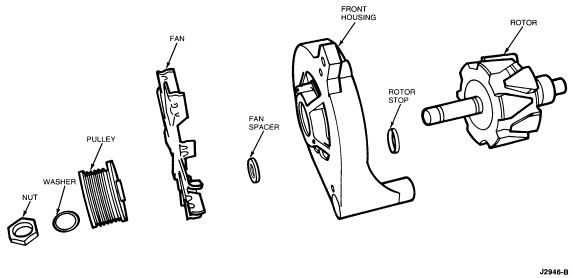
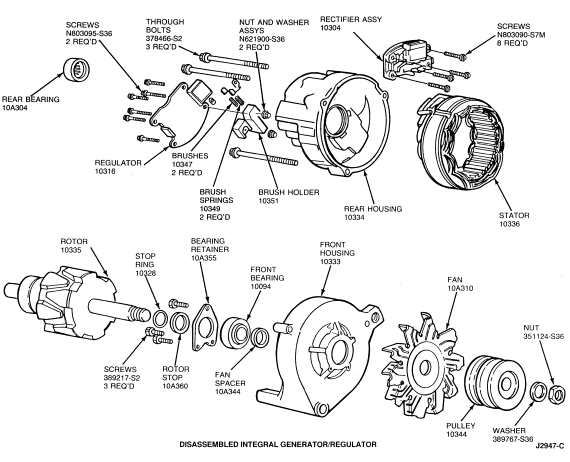
NOTE: All of the following Disassembly Steps may not be necessary to perform a particular test or service. Perform only those steps that apply. The following illustration is a disassembled view of the integral generator/regulator assembly. On generators with fan shield, remove retaining clip and then remove fan shield.


Disassembly
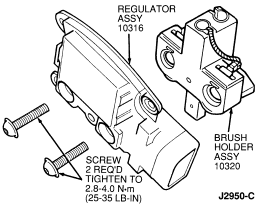
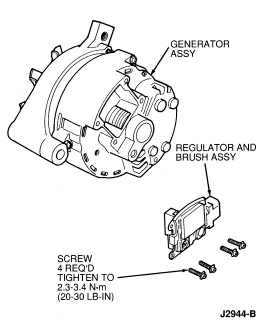
  1. Remove the four screws (T20 TORX®-type head) retaining the regulator to the generator rear housing. Remove the regulator, with brush holder attached, from the generator.


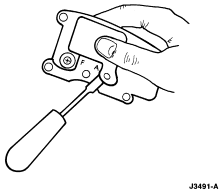
  1. Hold the regulator in one hand and break off the tab covering the 'A' screw head with a screwdriver.


  1. Remove two screws (T20 TORX® type head) retaining the regulator to the brush holder. Separate the regulator, retaining nuts, brushes and brush springs from the brush holder.


  1. Scribe a line across the end housings and stator laminated core for reference during generator assembly.
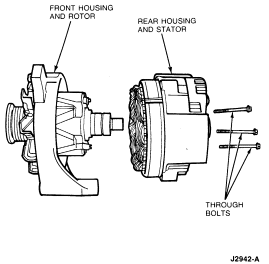
  1. Remove the three through bolts.
  1. Separate the front housing and rotor assembly from the stator and rear housing. It may be necessary to tap the front housing with a plastic tipped hammer to loosen the front housing from the stator core.


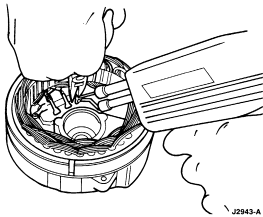
  1. Remove the three stator lead terminals from the rectifier. If the terminals are soldered in place, unsolder the connections using a 100-watt soldering iron. Do not allow the soldering iron to overheat the rectifier. Use needle-nose pliers to pull the stator lead terminals upward from the rectifier assembly. Separate the stator from the rear housing.


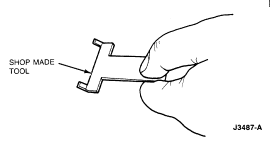
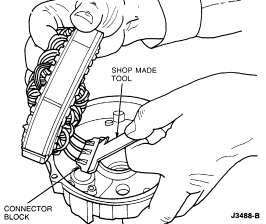
  1. Some generators are designed with a connector block. In these designs, the terminals are not soldered to the rectifier. Using a shop made tool, carefully pry the connector block straight up to avoid bending the terminals.


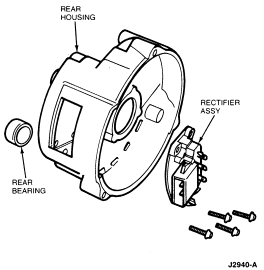
  1. Remove the four rectifier assembly retaining screws (T20 TORX®-type head). Remove the rectifier assembly from the housing.
  1. Using a suitable arbor press, remove the bearing from the rear housing. Support the housing close to the bearing boss to prevent housing damage.


  1. Clamp the rotor in a soft-jaw vise.
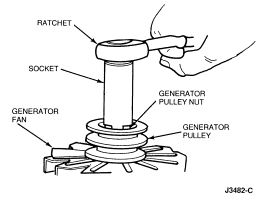
  1. Remove the pulley nut with a socket wrench.


  1. Remove the flatwasher, drive pulley, fan and fan spacer from the rotor shaft.
  1. Remove the housing from the rotor and remove the rotor from the vise.
  1. Remove the front rotor stop from the rotor shaft. Do not remove the stop ring from the rotor shaft unless it is damaged.
  1. Remove the screws retaining the bearing retainer to the front housing and remove the retainer.
  1. Remove the bearing from the front housing. If the bearing will not slide out, remove it using a suitable arbor press. Support the bearing close to the bearing boss to prevent damage to the housing.


     CAUTION: When rebuilding an integral generator, use only high-temperature bearings. Use of standard parts will result in generator failure.

  1. Wipe the stator, rotor and front bearing with a clean cloth. Do not clean these parts with solvent.
  1. Rotate the front bearing on the drive end of the rotor shaft. Check for any scraping noise, looseness or roughness. Look for excessive lubricant leakage. If any of these conditions exist, replace the bearing.
  1. Inspect the rotor shaft rear bearing surface for roughness or severe chatter marks. Replace the rotor assembly if the shaft is not smooth.
  1. Place the rear bearing on the slip ring end of the rotor shaft and rotate the bearing. Make the same check for noise, looseness and roughness as was made for the front bearing. Inspect the rollers and cage for damage. Replace the rear bearing if these conditions exist or if the lubricant is lost or contaminated.
  1. Check the slip rings for nicks and scratches. These may be removed by turning down the slip rings. Do not go beyond a minimum diameter of 31mm (1.22 inches). If the rings are badly damaged, replace the rotor assembly.
  1. Check all wire leads on both the rotor and stator assemblies for loose or broken connections. Check the windings for burned insulation. Replace parts that show signs of burned insulation.
  1. Check the pulley and fan for excessive looseness on the rotor shaft and for cracks or other damage. Replace any pulley or fan that is loose, cracked or bent out of shape.
  1. Check both the front and rear housings for cracks, particularly in the webbed areas at the mounting ear. Replace a damaged or cracked housing.
  1. Wipe the heat transfer grease from the rectifier assembly base and rectifier mounting area of the rear housing with a clean cloth.
  1. Replace the brushes if they are worn shorter than 6.35mm (1/4 inch) from the shunt.
 

Assembly

Refer to the following illustration for Generator/Regulator Assembly.


  1. Install the bearing in the front housing. Press on the outer race only.
  1. Position the bearing retainer on the front housing and install the retaining screws. Tighten the screws to 2.8-4.8 Nm (25-42 lb-in).
  1. If the stop ring was removed from the rotor shaft, install a new ring by sliding it over the end of the shaft and into the groove furthest from the pole piece. Do not open the ring with snap ring pliers as permanent deformation of the ring will result.
  1. Install the rotor stop on the rotor shaft with the recessed side against the stop ring.
  1. Install the rotor in the front housing and clamp the rotor in a vise equipped with protective jaws.
  1. Install the fan spacer, fan, drive pulley, flatwasher and nut on the rotor shaft. Tighten the nut to 82-135 Nm (61-99 lb-ft) with a socket wrench.


  1. Remove the rotor and housing assembly from the vise and check for free rotation of the rotor in the housing.
  1. Support the rear housing close to the bearing boss to prevent damage to the housing and install the bearing using a suitable arbor press. Press the bearing into the bore until it is flush with the outside rear surface of the housing.
  1. Wipe the rectifier assembly base plate with a clean cloth. Apply a 2.0mm (3/32 inch) wide by 20mm (3/4 inch) long strip of Ford Heat Transfer Compound E7AZ-19A426-A (ESF-M99G138-A) or equivalent lengthwise across the rectifier assembly base plate.
  1. Wipe the rectifier mounting surface of the rear housing with a clean cloth and seat the rectifier into the recessed mounting area.

     CAUTION: The rectifier assembly is cooled by conducting rectifier heat directly into the rear housing. Failure to remove foreign material from the mounting surfaces or failure to apply heat sink compound may cause rectifier overheating.
  1. Install the four rectifier assembly retaining screws. Tighten the screws to 2.8-4.0 Nm (25-35 lb-in).
  1. Position the stator assembly in the rear housing and align the scribe marks made during disassembly. Push the three stator terminals onto the rectifier blade terminals. Solder securely using resin core electrical solder if the terminals were previously soldered. Work quickly to prevent overheating the rectifier.
  1. Wipe the rear end bearing surface of the rotor shaft with a clean, lint-free cloth.
  1. Position the rear housing and stator assembly over the rotor and align the scribe marks made during disassembly.
  1. Seat the machined portion of the stator core into the stop in both end housings and install the housing through bolts. Tighten the bolts to 4.1-6.7 Nm (37-59 lb-in). Spin the rotor to check for free movement.
  1. Position the two nut and washer assemblies into the retaining slots in the brush holder. Tip the holder back slightly so that the nut and washer assemblies fall to the nut side of the slots. Insert the brush terminals past the washers and into the slots.


  1. Wipe the regulator base plate with a clean cloth. Position the regulator against the brush holder and install the regulator to brush holder retaining screws. Tighten the screws to 2.3-3.4 Nm (21-30 lb-in).
  1. Cover the head of the 'A' terminal screw head with electrical tape.
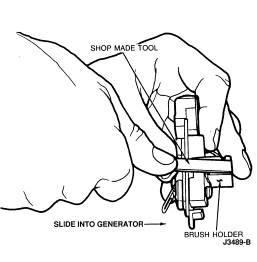
  1. Place brush springs in brush holder. Locate brushes in brush holder and hold in place with a thin, flat piece of steel (retaining tool). Loop the brush leads toward the brush end of the brush holder.


  1. Wipe the regulator mounting surface of the generator rear housing with a clean cloth. Position the regulator and brush holder assembly in the generator rear housing and pull the retaining tool.
  1. Install the regulator retaining screws. Tighten the screws to 1.7-2.8 Nm (16-24 lb-in).