Section 15-01: Radio and Tape Chassis | 1993 Mustang Workshop Manual |
DESCRIPTION AND OPERATION
Compact Disc Player
The following is a description of the various controls.
NOTE: Three inch compact disc singles are not recommended for use with the Ford
Compact Disc Player.
Once a disc is inserted, the operation of the disc will override that of
the cassette player or radio. The volume, tone and fader controls on the radio
are used to control the sound of the compact disc player.
NOTE: The CD player has heat protection circuitry to protect the laser diode.
If the temperature of the player reaches 80°C
(176°F), the heat detection circuit will shut off the player
and "H" will appear in the display. When the temperature is within normal
operating range the "H" indicator will turn off and the CD player will again be
operational.
 WARNING: USE OF CONTROLS AND ADJUSTMENTS OR PERFORMANCE OF PROCEDURES OTHER
THAN THOSE SPECIFIED MAY RESULT IN HAZARDOUS RADIATION EXPOSURE.
WARNING: USE OF CONTROLS AND ADJUSTMENTS OR PERFORMANCE OF PROCEDURES OTHER
THAN THOSE SPECIFIED MAY RESULT IN HAZARDOUS RADIATION EXPOSURE.
THE USE OF OPTICAL INSTRUMENTS WITH THIS PRODUCT WILL INCREASE EYE HAZARD
AS THE LASER BEAM USED IN THE COMPACT DISC PLAYER IS HARMFUL TO THE EYES. DO
NOT ATTEMPT TO DISASSEMBLE THE CASE. REFER SERVICING TO QUALIFIED PERSONNEL ONLY.
- POWER: Push to turn radio ON, push again to turn OFF.
- AUDIO: The audio button is used to adjust bass, treble,
speaker balance and fade. Illuminated bars in display will show relative
positions.
- BASS: Push AUDIO button repeatedly until BASS is displayed.
Push the right (+) side of VOLUME button to increase low frequency sounds or
left (-) side to decrease low frequency sounds.
- TREBLE: Push AUDIO button repeatedly until TREB is
displayed. Push the right (+) side of VOLUME button to increase high-frequency
sounds or left (-) side to decrease high-frequency sounds.
- SPEAKER BALANCE: Push AUDIO button repeatedly until BAL is
displayed. Push the right (+) side of VOLUME button to shift sound to right
speakers or left (-) side to shift sound to left speakers.
- SPEAKER FADE: Push AUDIO button repeatedly until FADE is
displayed. Push the right (+) side of VOLUME button to shift sound to rear
speakers or left (-) side to shift sound to front speakers.
- BAND INDICATOR: Indicates if band is in AM, FM1 or FM2
setting.
- STATION INDICATOR: Indicates radio station frequency in
radio mode. When tape is played, whirling sprockets indicate direction of tape
travel.
- TAPE OPENING: Cassette tape player is equipped with power
loading. When tape is inserted (with open edge to the right) the loading
mechanism draws the tape in the rest of the way and begins to play.
- SCAN TUNE:
- Press SCAN TUNE button to enter scan mode
(display will blink SCN). Pushing the right (>) side of SEEK button will begin
forward scan mode up to the next radio station for a five second sampling, or a
five second sampling of the next tape selection on tape currently playing.
Pushing left (<) side of SEEK button will begin reverse
scan mode to previous radio station for a five second sampling or a five second
sampling of previous tape selection on tape currently playing.
- To stop scan mode on presently sampled radio station, press the side of SEEK button which
matches the direction the radio is currently scanning or re-press SCAN TUNE button.
- To stop scan mode on presently sampled tape selection, press the
side of SEEK button which matches the direction tape is currently scanning.
- To change radio stations up or down by one increment, push SCAN TUNE button
twice (display reads TUNE), then within five seconds press and release either
right (>) or left (<) side of SEEK button. To change
stations quickly, press and hold either the right or left side of SEEK button.
- PLAY PROGRAM: This button will cause the changer to begin
playing from the last disc and track where it left off. When the last track of
the current disc is completed, the changer will automatically advance to the
next disc and begin play at track number 1.
- REVERSE: Pressing this button once causes the changer to go
back to the previous disc and resumes play at track number 1. Continuously
pressing this button will cause the changer to "back track" to previous discs
until the first disc is reached. Then it will "wrap around" to the last disc
and continue the process again.
- FAST FORWARD:This button advances the disc changer to the
next disc and resumes play at track number 1. Repeatedly pressing this button
will cause the changer to advance through the discs. When the changer reaches
the last disc, it will "wrap around" to the first disc and continue the process.
- EJECT: In play mode, the "EJECT" button will stop disc
operation.
- DOLBY: The double-D symbol button will compress the dynamic
range so that low level music signals are audible in the car.
- SEEK: Pressing the right side (>) of this button will cause
the changer to advance to the next track on the current disc and resume play.
Continuously pressing this button will advance the changer to the next tracks
until the last track is reached. It will then play the last track and proceed
to the next disc.
Pressing the left side (<) of this
button will cause the changer to go back to the previous track on the current
disc and resume play. Continuously pressing this button will cause the changer
to "back track" to the previous tracks until the first track is reached. It
will then play through the disc beginning with the first track.
- AUTO PRESET: Push the AUTO PRESET button for three seconds
to use automatic memory store feature. The radio will automatically seek six
strong stations and set them sequentially on memory buttons 1 through 6.
- MEMORY BUTTONS: The six memory buttons are used to store
preferred broadcast stations in radio memory. To store a station, tune to
desired station, push memory button in and hold for approximately two seconds
until station sound returns, then release button. Repeat process for each
memory button. Once a station is stored in memory, pushing a memory button for
less than two seconds will cause radio to turn to stored station. All six
memory buttons will store a station on AM, FM1 or FM2 for a total of 18
storable radio stations.
- AM/FM: Each successive push, when in radio mode, will select
AM, FM1 or FM2 as indicated by band indicator in display window.
- VOLUME: Push right (+) side of VOLUME button to increase
volume. Push left (-) side to decrease volume. If VOLUME button is held to the
right or left, the volume will continuously increase or decrease (bars in
display will show relative volume) until button is released.
NOTE: If the VOLUME button is set above a preset listening level when ignition
switch is turned off, when ignition switch is turned back on, the volume will
return to a nominal listening level. However, if radio power is turned off with
the POWER button before ignition is turned off, volume will return to the
position it was set at previously, at when radio power is switched back on.
The magazine is removeable and can hold up to 10 compact discs.
Changer Error Messages
The PAC radio is designed to diagnose certain disc changer conditions.
The error codes are as follows:
- Error 0 — Communication error between radio
and changer.
- Error 1 — Disc magazine not loaded in
changer.
- Error 2 — No discs loaded in disc magazine.
- Error 4 — Focus error.
- Error 99 — Error undetermined (system
default).
Compact Disc Radio (CDR)
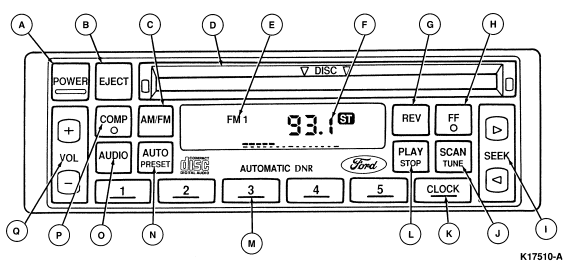
The features described are identical on all PAC radios.
- POWER: Push to turn radio ON, push again to turn OFF.
- EJECT: Press EJCT button to eject CD. The radio will resume
playing if power is ON.
- AM/FM: Each successive push, when in radio mode, will select
AM, FM1 or FM2 as indicated by band indicator in display window.
- DISC SLOT: When inserted, the disc automatically loads into
the unit and play starts at the beginning of the first selection. The play
indicator illuminates and the number "1" (track) and "0:00" (elapsed time) are
shown on the digital display (F). When the disc player reaches the end, the
disc player automatically returns to the beginning of the disc and resumes
playing.
NOTE: Once a disc is inserted, the disc opening door locks to prevent the
accidental insertion of a second disc.
- BAND INDICATOR: Indicates if band is in AM, FM1 or FM2
setting.
- STATION INDICATOR: Indicates radio station frequency in
radio mode. Indicates track and time elapsed in CD mode.
- REV:
- Holding in the REV button less than three seconds, causes the CD mechanism to reverse at three times normal play speed (elapsed
time is displayed). Holding the button for a period greater than three seconds
results in the mechanism reversing at ten times normal play speed.
- The mechanism will reverse to the beginning of track one and begin playing if the
button is held continuously.
- If a track change occurs while reversing, the new track number is displayed for three seconds after the key is released (this
occurs when entering fast reverse while in Elapsed Time or Time of Day display
mode).
- FF: Fast forward performs the opposite of that mentioned for
Fast reverse (REV).
NOTE: The mechanism will forward to the end of the last track if the button is
held in continuously. When reaching the end of the disc, the mechanism will
pause and the display will indicate "End." Pushing any CD key (except FF) will
abort the pause condition and execute the respective function. Momentarily
depressing "PLAY/STOP" will abort Pause and begin playing the first track of
the disc.
- SEEK: Push right (>) side of SEEK button to tune radio to
the next higher frequency station or to beginning of next track selection on CD
currently playing. Push left (<) side of SEEK button to
tune radio down to next lower frequency station or to the beginning of track
selection currently playing.
- SCAN TUNE:
- Press SCAN TUNE button to enter scan mode (display will blink SCN). Pushing the (>) side of SEEK button will begin
forward scan mode up to the next radio station for a five second sampling, or
an eight second sampling of the next CD track.
- Pushing left (<) side of SEEK button will begin reverse scan mode to
previous radio station for a five second sampling or an eight second sampling
of the previous CD track selection. To stop scan mode on presently sampled
radio station, press the side of SEEK button which matches the direction the
radio is currently scanning or re-press SCAN TUNE button. To stop scan mode
presently sampled CD track selection, press the side of SEEK button which
matches the direction CD is currently scanning. To change radio stations up or
down by one increment, push SCAN TUNE button twice (display reads TUNE), then
within five seconds press and release either right (>) or left
(<) side of SEEK button. To change stations quickly, press
and hold either the right or left side of SEEK button.
- CLOCK: The clock can be set at any time (Tape, Radio, CD,
Power "off", Ignition "off"). First, depress the CLOCK button and
simultaneously depress "SEEK<" to advance minutes. The
CLOCK button must be held in throughout the time setting operation.
Seconds
are reset to zero when the CLOCK button is released.
- PLAY/STOP: When a disc is loaded the unit automatically
enters the play mode (play indicator illuminates). To stop temporarily, press
PLAY/STOP button. Operation returns to the radio or tape mode. To resume CD
play, press this button once again. If the ignition key is turned OFF during
play but is set to RUN or ACCESSORY at any time later, play will resume.
- MEMORY BUTTONS: The five memory buttons are used to store
preferred broadcast stations in radio memory. To store a station, tune to
desired station, push memory button in and hold for approximately two seconds
until station sound returns, then release button. Repeat process for each
memory button. Once a station is stored in memory, pushing a memory button for
less than two seconds will cause radio to turn to stored station. All six
memory buttons will store a station on AM, FM1 or FM2 for a total of 15
storable radio stations.
- AUTO PRESET: Push the AUTO PRESET button for three seconds
to use automatic memory store feature. The radio will automatically seek five
strong stations and set them sequentially on memory buttons 1 through 5.
- AUDIO: The audio button is used to adjust bass, treble,
speaker balance and fade. Illuminated bars in display will show relative
positions.
- BASS: Push AUDIO button repeatedly until BASS is displayed.
Push the right (+) side of VOLUME button to increase low
frequency sounds or left (-) side to decrease low frequency sounds.
- TREBLE: Push AUDIO button repeatedly until TREB is
displayed. Push the right (+) side of VOLUME button to increase
high-frequency sounds or left (-) side to decrease high-frequency sounds.
- SPEAKER BALANCE: Push AUDIO button repeatedly until BAL is
displayed. Push the right (+) side of VOLUME button to shift
sound to right speakers or left (-) side to shift sound to left speakers.
- SPEAKER FADE: Push AUDIO button repeatedly until FADE is
displayed. Push the right (+) side of VOLUME button to shift
sound to rear speakers or left (-) side to shift sound to front speakers.
- COMPRESS: Because of the wide dynamic range of the compact
disc player, soft passages may be difficult to hear under certain driving
conditions while maintaining a reasonable volume level in the louder passages.
The compression feature will bring the softer and louder passages closer
together for a more consistent listening level. To activate the compression
feature, press the COMPRESS button, the compression indicator (COMP) will
illuminate in the display.
- VOLUME: Push right (+) side of VOLUME button
to increase volume. Push left (-) side to decrease volume. If VOLUME button is
held to the right or left, the volume will continuously increase or decrease
(bars in display will show relative volume) until button is released.
NOTE: If the VOLUME button is set above a preset listening level when ignition
switch is turned off, when ignition switch is turned back on, the volume will
return to a nominal listening level. However, if radio power is turned off with
the POWER button before ignition is turned off, volume will return to the
position it was set at previously when radio power is switched back on.